
CPP (Canada Pension Plan) Retirement Calculator
In this Canadian retirement income calculator, I’ll simplify the process to calculate your income at retirement such as CPP and OAS. For other calcualtors Official Canadian Financial Calculators and Budget Planner Tools.
Smart Retirement Planner
Planning for retirement doesn’t need to be complicated. Here’s a straightforward overview to help you get started, based on the official advice from Canada’s retirement-savings experts.
Why It Matters
- Early planning gives you time for your savings to grow as compound interest works in your favour.
- Having a retirement plan helps you stay financially secure and maintain peace of mind, no matter what life brings.
- A clear plan makes it easier to set realistic goals, whether that’s retiring early, covering basic living costs, or enjoying travel and leisure.
First Steps to Getting Started
- Know Your Retirement Income Sources
- Consider public pension benefits (e.g. government retirement benefits).
- Factor in workplace pensions.
- Think about personal savings such as registered (e.g. RRSPs) or non-registered accounts.
- Estimate Your Future Needs
- Calculate what kind of lifestyle you want in retirement (basic expenses, travel, hobbies, etc.).
- Estimate income needed to support that lifestyle, and compare with potential income sources.
- Start Saving Early and Consistently
- Even modest, regular contributions can add up over decades.
- Automate savings if possible and treat saving as a recurring expense.
- Choose the Right Savings Vehicles
- Registered savings accounts (like retirement savings plans) and tax-advantaged, designed for long-term growth.
- Diversified investments (e.g. low-fee funds) to build a balanced portfolio over time.
- Adjust as Life Changes
- Update your plan if income, lifestyle or financial goals change.
- Review periodically to make sure the plan still reflects your retirement vision.
A Simple 3-Phase Plan
- Phase 1 Now: Assess current income, debts, expenses, and start contributing regularly to savings.
- Phase 2 Mid-career: Maximize saving potential, diversify investments, adjust for life and career changes.
- Phase 3 Pre-retirement: Reevaluate goals, project retirement needs, tighten savings strategy, shift toward stable income-generating or low-risk assets.
Why This Approach Works
- Flexibility: You set the pace and start small, scale up as you go.
- Clarity: By estimating future needs early, you avoid unpleasant surprises later.
- Tax and Growth Efficiency: Using retirement-specific savings vehicles helps your money grow more effectively over time.
- Resilience: A diversified, long-term plan withstands market fluctuations and life changes.
Where Your Retirement Income Should Come From
Planning for retirement starts with understanding where your future income will come from. In Canada, there are three main pillars and ideally, you aim to tap into all of them for a comfortable retirement.
The Three Pillars of Retirement Income
1. Public Pensions
- Government-provided pensions form the foundation. That includes programs like the public pension plans (CPP, CPP PRB, QPP) and old-age benefits (OAS and GIS) provided by the Canadian government.
- These provide a baseline income once you retire and giving you financial security even if your savings or investments are modest.
2. Employer or Private Pensions
- Many Canadians have access to workplace pensions or group retirement savings plans through their employer such as employer registered pension plan (RPP), group RRSP, group TFSA, and pooled registere pension plan (PRPP).
- These pensions can be a major source of stable, predictable retirement income, supplementing public pensions.
3. Personal Savings and Investments
- Your own savings including retirement-specific plans (registered savings accounts) or non-registered investments are essential.
- With sufficient savings and wise investment choices, you can maintain or even improve your lifestyle after retirement.
- Regular contributions over time significantly boost long-term retirement security.
How to Use This Framework
| Step | What to Do |
|---|---|
| 1. Estimate Your Future Needs | Think about the lifestyle you want in retirement. Basics expenses, lifestyle expenses, travel, hobbies. |
| 2. Review Public & Employer Pension Entitlements | Check what you’ll get from government pensions and any workplace pension plans. |
| 3. Build Personal Savings & Investments | Contribute regularly to retirement savings, registered or others. Diversify investments to manage risk. |
| 4. Combine All Three Sources | Use public pensions + employer/ private pensions + personal savings to cover living costs and comfort. |
| 5. Adjust as Needed Over Time | As life changes (job, spending, goals), revisit your plans and savings/investment strategy. |
Refer to the official Retirement Checklist for further information on the checklist that will build the foundation for your retirement income calculator. For Quebec residents, please refer to this extensive source with programs for seniors.
It is impossible to cover all the details in a single blog post, hence, it is very important to consider all other options such as benefits, discounts, tax credits, or even a Annuities. All these are important in an efficient retirement income calculator.
Canadian Retirement Income Calculator
This Canadian Retirement Income Calculator helps you estimate how much money you might have when you retire. If you have doubts or need assistance, please consult a professional.
What Is the Retirement Income Calculator
- The calculator is an official government tool that estimates how much monthly income you can expect to receive through the Canada Pension Plan when you retire.
- It lets you test different retirement ages and contribution histories to see how your pension amount will change.
- It’s free, easy to use, and specifically tailored for Canadian residents to project their retirement income based on real data instead of assumptions.
How to Make the Most of the Calculator
- Gather Your Contribution History: Input years worked and contributions to get accurate results.
- Test Different Retirement Ages: See how retiring earlier or later affects the monthly payout.
- Use It as a Benchmark: Treat the result as the foundation of your retirement income plan.
- Combine with Other Income Sources: Don’t rely solely on CPP but plan for personal savings, pension plans, and investments too.
- Revisit Periodically: Update with any changes in your work history or retirement plans to keep projections current.
Gather Below Information Before You Use the Calculator
To get the most accurate insights from the tool, consider gathering the following resources based on the income sources you want to include:
| Income sources to examine | Resources to gather |
|---|---|
| Canada Pension Plan (CPP) retirement benefits | CPP Statement of Contributions or QPP Statement of Participation |
| Old Age Security (OAS) pension | Your residence history in Canada |
| Employer pension (if applicable) | Financial information about your employer pension |
| Retirement savings like RRSPs and TFSAs (if applicable) | Statements for your RRSPs and TFSAs |
| Other income (if applicable) | Statements for other savings that will provide ongoing monthly retirement income (annuities, foreign pensions, survivor pensions, etc.) |
First step is to go online to the My Service Canada Account (MSCA) and obtain your CPP Statement of Contributions (SOC). If you are a Quebec resident, use Retraite Québec for QPP SOC.
Once you gathered the above information, go to Canada Retirement Income Calculator.
Recap of Canadian Retirement Income Sources
- Canada or Québec Pension Plan (CPP or QPP): Starting at age 65, the maximum monthly CPP payment in 2026 is $1,507.74. This is calculated mainly by the contributed amount, years of contribution, and age of collection. Refer to CPP payment.
- Old Age Security (OAS): Any Canadian citizen or permenant resident over the age of 65+ who lived in Canada at least 10 years (or 20 years if living abroad) after age 18. To receive the maximum OAS, you must have lived in Canada 40 of the 47 years between ages 18 and 65. For 2026, the maximum OAS is $740.09 per month for those aged 65–74, and $814.10 per month for those 75 and over. More information on OAS payment.
- Guaranteed Income Supplement (GIS): A supplementary income for low income individuals. For full details of the max earnings based on the incom refer to GIS amount.
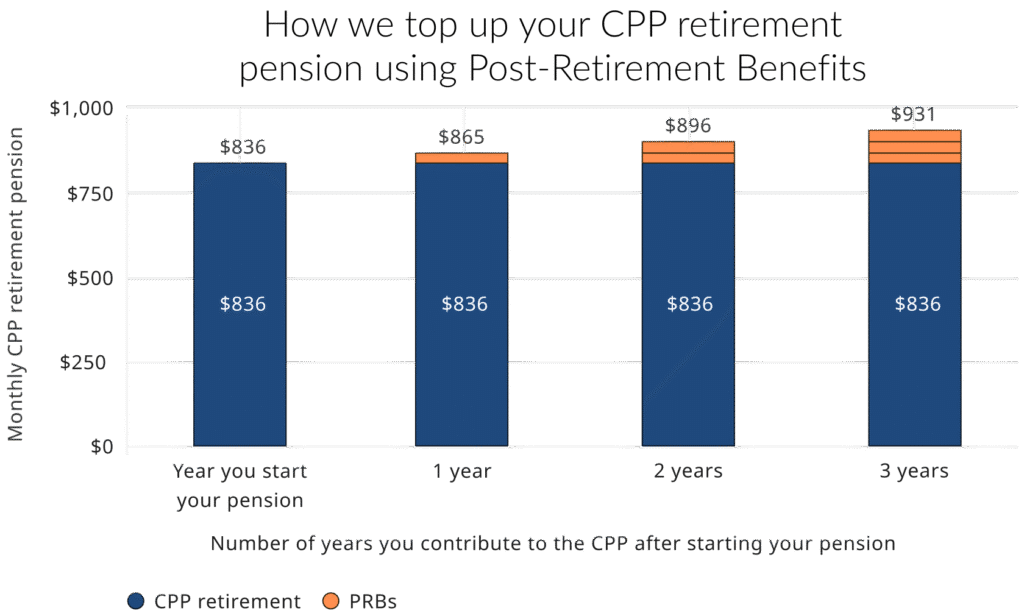
- CPP Post-Retirement Benefit (PRB): If you continue to work while receiving CPP, and under age 70, you can continue to participate in the CPP. Your CPP contributions will create Post-Retirement Benefits (PRBs), which will increase your retirement income.
Other Canadian Pension Calculator and CDRO
Thanks to Dale from Cut the Crap Investing for highlighting another excellent tool: MayRetire. This calculator provides province-specific projections and incorporates government benefits such as CPP, QPP, and OAS. It also models all major account types, including TFSA, RRSP, LIF, RRIF, and non-registered accounts, while allowing users to input additional income sources such as defined-benefit pensions or rental income.
Another resource is by Doug Runchey from Retire Happy who provides a fantastic pension calculator accounting for CPP and QPP readily available to be downloaded from Finiki site. Doug covers a hidden fact about CPP which allows parents to get more by using the Child Rearing Drop Out (CDRO) explained here.
The easy way is to go to finiki link below. From my homework and calculations using Doug Runchy’s info it appears very accurate. https://www.finiki.org/wiki/CPP_and_QPP_calculator
Get your statement from the government and fill in spreadsheet. Calculates CPP amounts for ages 60-70.
sorry, doug runchey
Thank you! I didn’t know about this calculator. Going to update the post to include it as a reference.
finiki is a fantastic financial reference. It is tied into financialwisdom forum. Another great resource.
Hi, your retirement calculator link does not work. Can you please update? With thanks,
Dale @ Cut the crap investing
Hi Dale. What a pleasure to have you here. I hope the post was accurate.
Regarding the link, I believe you are referring to the annoying automatic Google “Ad intents”. I never noticed them until now. Hence, I just disabled this kind of Ad. Let’s see if they vanish.
The main calculator links to the Canada government site here: https://srv111.services.gc.ca/generalinfo/index
Thank you, it looks like the calculator link was removed. I’ll check out the gov tool, but I believe it is lacking in robustness for planning and optimization.
Check out MayRetire. That’s what we’ve been using quite a bit lately.
It’s very powerful and by far the easiest to use, so intuitive.
Let me know what you think.
Dale
Thanks a lot, Dale. Oh wow! MayRetire looks great. I will add it to the post.